I like it when I don't share my emails, unpublished blog posts and company secrets with an external company that is not essential for hosting them. Especially as in the space of web app security, accidents happen.
That's why, even as everyone who ever read my first draft of anything agrees that I probably have dyslexia, I don't use any spellcheckers. The advanced ones require me to send my texts to their servers, and less advanced ones are just not that ducking great.
Once in a while I do wish I used one, especially when I notice a typo in something I published (I'm the kind of person that edits WhatsApp messages after they're sent, just to fix a typo).
The Perfect Spellchecker
I don't want anything to correct my style or tell me what I should write. Last time I asked an LLM for feedback about an article, it told me "Use emoticons sparingly in a semi‑formal article." Well, take that Skynet 💥🤖💣💨❤️.
I do want a spellchecker that corrects my typos and improves my grammar wherever my Polish brain constructs a sentence that has no place in the English language. I wouldn't even mind if it split very long sentences into shorter ones. I care about my texts being comfortable to read.
I like transparency. No one reading my stuff would be interested in a list of my typos that an LLM fixed, but publishing a prompt that I used to fix them - that sounds like the right level of transparency.
The Power of Local LLMs
Local LLMs are not only less capable than SOTA ones (ChatGPT, ClaudeAi, Gemini), but also slower. On the other hand, they're catching up fast. If you don't want to use ChatGPT but you like its capabilities for your spellchecking, just publish your article in 6-12 months and you'll have the same capabilities on your laptop 😜. The good news is that you don't need to wait if you have a process that doesn't require speed. In my opinion (though I'm aware that's controversial), a spellchecker is a good example of that.
I don't really need the spellchecker to underline my every tiny mistake while I type, which would interrupt my writing process. If it's good at figuring out what I meant from a broader context, I'm perfectly fine running it once just before publishing. And locally running models are good enough for that for at least a year. Sure, gpt-oss:20b needed 3 minutes to correct this article, but I was perfectly fine working on something else during that time.
After running the script, I get the document checked and fixed. No data left my laptop. I didn’t even need an Internet connection. It's exactly what I needed.
A Process for Spellchecking Your Article
All I did was go to the directory where I have this article and run the following command:
pi --model ollama/gpt-oss:20b -p "Fix grammar and typos in this file. Edit the file in place with your corrections. Keep the style, even if it's controversial. I just want the obvious things fixed. If long sentences can be split into shorter ones, though, split them so the text was more comfortable to read." @a-very-private-advanced-spellchecker.md
For that to work, you need to:
- Install ollama.
- Install pi.
- Run
ollama run gpt-oss:20b(that will take a moment, and 13 GB of your storage). - Update Pi's config file (on mac: ~/.pi/agent/models.json) to use more or less like this:
{
  "providers": {
    "ollama": {
      "baseUrl": "http://localhost:11434/v1",
      "api": "openai-completions",
      "apiKey": "ollama",
      "models": [{ "id": "gpt-oss:20b" }]
    }
  }
}
A couple hints:
- I have a Mac M1 Pro with 32 GB of RAM; if you have less than that, it might not work (though why not try?)
- I use git to keep the history of changes of my articles. Some kind of version control system is useful because then you won't lose what you wrote if an LLM makes a change that you don't like.
Here's what the model found:
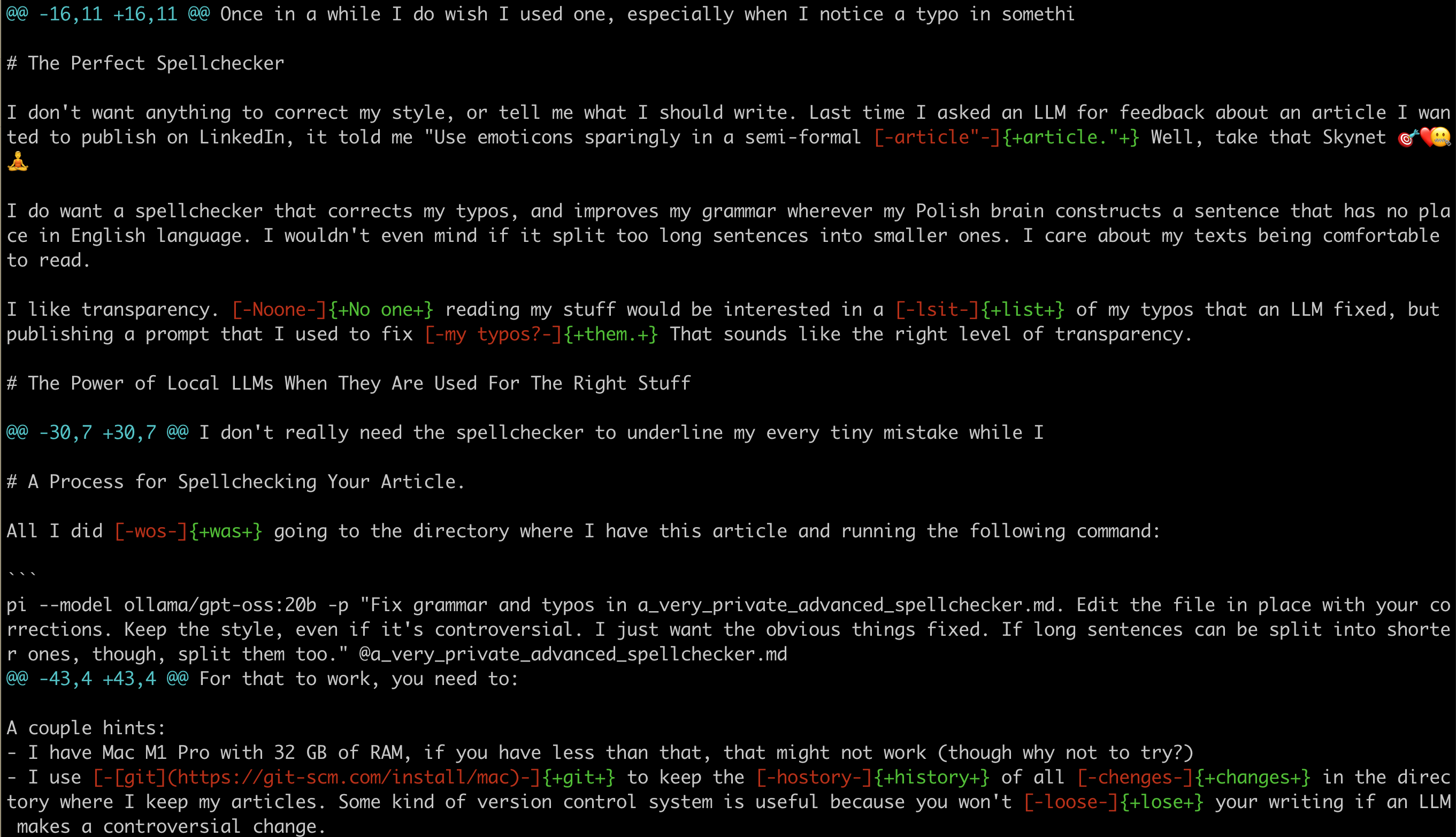
As you can see:
- It works pretty well.
- It can sometimes break something (like it removed my link to git).
- It works even faster than I expected (I originally guessed 7 minutes, but it finished in 3).
- It didn’t catch some problems but then it did after I ran it again 😊